
Search and Filters
Omnismith provides a dynamic query engine for searching entity records across templates. You can combine global full-text search with field-level filter conditions and custom sorting.
1. Querying Capabilities
Section titled “1. Querying Capabilities”Full-Text Global Search
Section titled “Full-Text Global Search”- Enter search terms into the search bar at the top of any entity template view.
- Searches across text attributes (Dimensions), list labels, and reference display names.
Attribute Filter Chips
Section titled “Attribute Filter Chips”Filter entity records by specific attribute conditions using flexible comparison operators:
| Attribute Type | Available Operators | Example Filter Condition |
|---|---|---|
| String | Equals, Contains, Starts With, Is Empty | Hostname contains "prod" |
| Number / Metric | =, >, <, >=, <=, Between | CPU Usage > 80 |
| List | In, Not In, Is Empty | Status in [Online, Degraded] |
| Date / DateTime | Before, After, Between, Is Today | Created After 2026-01-01 |
| Reference | Equals, In, Is Unlinked | Customer = ACME Corp |
2. Step-by-Step Filter Construction
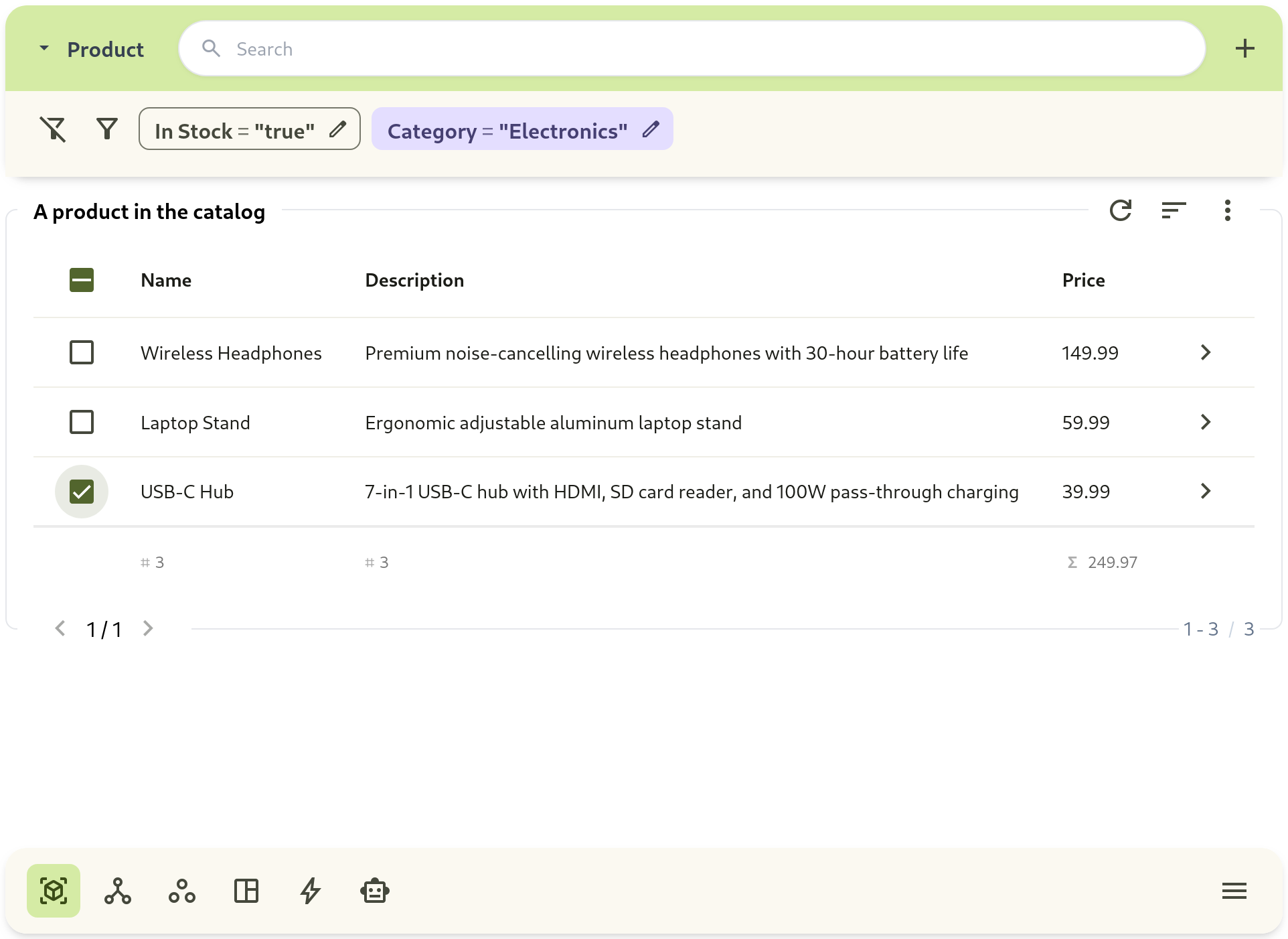
Section titled “2. Step-by-Step Filter Construction”- Navigate to Workspace and select your template.
- Click + Add Filter next to the search bar.
- Select an attribute (e.g.
Status), operator (e.g.Equals), and value (e.g.Online). - Add additional filter chips to form compound logical queries (
ANDconditions). - Click column headers to adjust sort direction (Ascending / Descending).
3. Native Semantic Vector Search (Natural Language Intent)
Section titled “3. Native Semantic Vector Search (Natural Language Intent)”In addition to traditional keyword matching, Omnismith provides Native Semantic Vector Search across entities:
- Search Modes:
- Keyword Mode: Direct lexical matching and field substring queries.
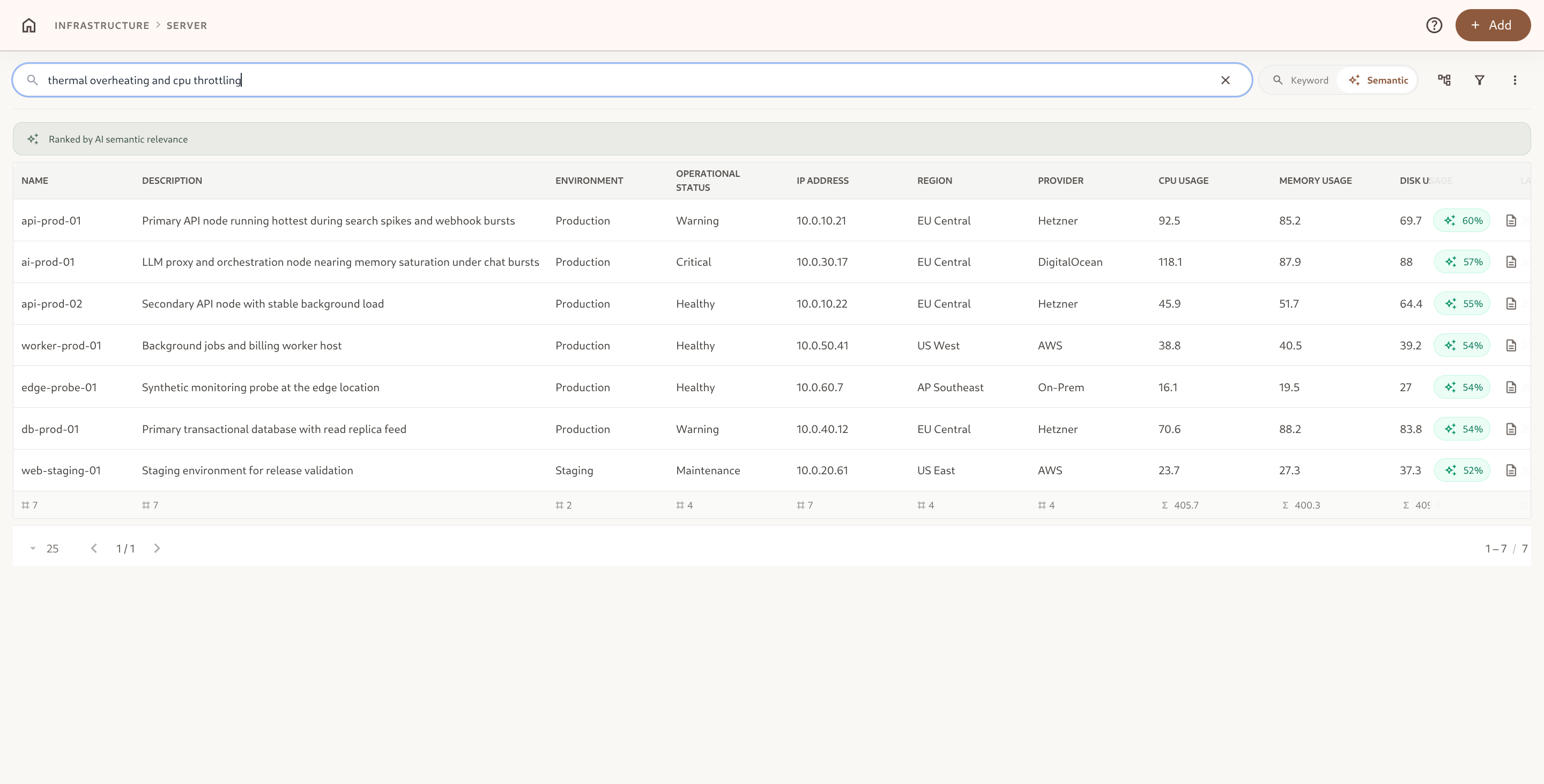
- Semantic Mode: Searches records based on conceptual meaning, synonyms, and natural language symptoms (e.g., searching “thermal throttling and high heat” retrieves records mentioning “fan speed degraded; CPU temperature peaked at 98°C”).
- Cosine Proximity Ranking: Results are ranked by semantic similarity score (from
0.0to1.0/ percentage match), prioritizing the most contextually relevant entities. - Enterprise Security & Scope: Semantic vector queries enforce active workspace RBAC and row-level access permissions at query time, guaranteeing that unauthorized records are never returned.
Programmatic Semantic Search API (POST /api/v1/entities/semantic-search)
Section titled “Programmatic Semantic Search API (POST /api/v1/entities/semantic-search)”External applications, AI agents, and automated pipelines can query the semantic search endpoint by supplying a 768-dimensional query embedding vector:
curl -X POST "https://api.omnismith.io/api/v1/entities/semantic-search" \ -H "Authorization: Bearer omni_live_secret_key_12345" \ -H "Content-Type: application/json" \ -d '{ "query_vector": [0.042, -0.015, 0.089, ...], "template_id": "server_node", "limit": 10, "threshold": 0.65 }'[ { "similarity_score": 0.942, "entity": { "id": "019fe207-38eb-7182-9a5f-70cdaeea34f2", "template_slug": "server_node", "attribute_values": { "hostname": "prod-worker-04", "status": "Degraded", "issue_description": "Fan RPM degraded; temperature spike causing throttling" }, "list_item_ids": { "status": "019fe207-38eb-7182-9a5f-70cdaeea3a03" }, "reference_entity_ids": {}, "file_ids": {} } }]4. Programmatic Search & Filtering by Slugs
Section titled “4. Programmatic Search & Filtering by Slugs”The Search API (POST /api/v1/entities/search/{templateId}) takes filter_groups: a list of groups, where the clauses inside a group are AND-ed and the groups are OR-ed. [[a, b]] is a AND b; [[a], [b, c]] is a OR (b AND c); [] applies no filter. Fields are attribute slugs or UUIDs, or the standard id, created_at, updated_at.
curl -X POST "https://api.omnismith.io/api/v1/entities/search/server_node" \ -H "Authorization: Bearer omni_live_secret_key_12345" \ -H "Content-Type: application/json" \ -d '{ "global_search": "prod", "filter_groups": [ [ { "field": "cpu_usage", "operator": "gt", "value": "80" }, { "field": "status", "operator": "in", "value": ["019fe207-38eb-7182-9a5f-70cdaeea3a01", "019fe207-38eb-7182-9a5f-70cdaeea3a02"] }, { "field": "created_at", "operator": "between", "value": ["2026-01-01", "2026-03-31"] } ], [ { "field": "status", "operator": "eq", "value": "019fe207-38eb-7182-9a5f-70cdaeea3a09" } ] ] }'List and reference filters compare against the stored id, not the label — take it from list_item_ids / reference_entity_ids of a previous read, or from the attribute’s items.
Supported Filter Operators
Section titled “Supported Filter Operators”| Operator | Value | Meaning |
|---|---|---|
eq / neq | string | Exact equality / inequality |
gt / lt | string | Greater than / less than (numbers, dates, timestamps) |
like / not-like | string | Case-insensitive substring match |
in / not-in | list of strings | Matches any / none of the listed values or ids |
between | [lower, upper] | Inclusive range on number, date and datetime attributes and on created_at / updated_at |
empty / not-empty | — | Has no value / has a value |
Filtering Through a Reference
Section titled “Filtering Through a Reference”A field may be a one-hop path <reference attribute>.<attribute of the linked record>. To find every server whose linked customer is on the Free tier:
{ "filter_groups": [ [ { "field": "customer.tier", "operator": "eq", "value": "019fe207-38eb-7182-9a5f-70cdaeea3a42" } ] ]}The linked record is read with the caller’s own permissions: the path is refused when the caller cannot view the linked template, and row-level access rules on that template decide which linked records can match.
An unknown field, an operator that does not fit the field, or a malformed value is refused with 400 and a message naming the valid fields.