
External Keys
An External Key is the id another system uses for a record — a Stripe customer id, a hostname, a device serial, an order number — stored on the record itself. With it, any integration can say “write to the record that my system calls cus_123” without knowing or storing Omnismith’s record ids, and sending the same key twice always lands on the same record.
1. How Keys Work
Section titled “1. How Keys Work”- One key per record, unique per template. No two live records of the same template hold the same key. Different templates may reuse a key.
- A standard field, like
id,created_atandupdated_at— not an attribute. It is returned with every record asexternal_key(nullwhen unset). - Opaque and case-sensitive. Leading and trailing spaces are trimmed; the key is 1–255 characters with no control characters. Keys may contain
/,:and spaces. - Deleted records release their key. After a record is deleted, a new record can take its key; the deleted record keeps showing it in its history.
When one template is fed by several systems, namespace the keys with a prefix — stripe:cus_123, shopify:4410 — so ids from different senders can never collide.
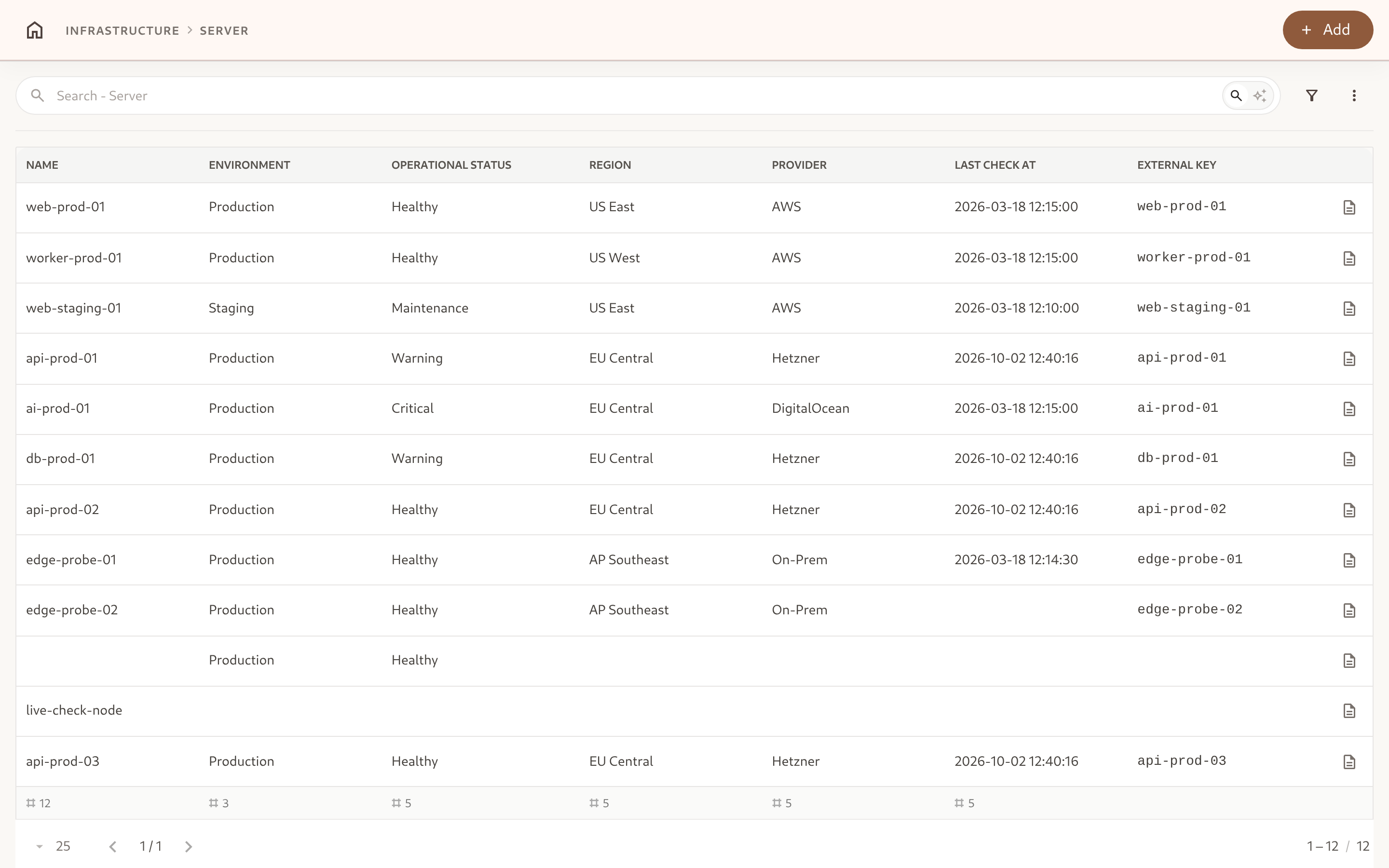
In the app, the key appears in a record’s details, as the External key column (choose it under ⋮ → Visible attributes in a template list), on grid cards, and as a filter field.
2. Setting a Key
Section titled “2. Setting a Key”Keys are written through the API, CSV import, and Inbound Endpoints, which fill them in from each delivery.
| Write | Key behaviour |
|---|---|
POST /v1/entities/template/{template} | Optional external_key in the body. A key another live record holds is 409. |
PATCH /v1/entities/{id} | Optional external_key: a string sets or changes it, null clears it, omitted leaves it. A request that only changes the key needs no attributes. |
PUT /v1/entities/{id} | Leaves the key untouched — replace concerns attribute values only. |
curl -X PATCH "https://api.omnismith.io/v1/entities/$ENTITY_ID" \ -H "Authorization: Bearer omni_live_secret_key_12345" \ -H "X-Omnismith-Project-Id: $PROJECT_ID" \ -H "Content-Type: application/json" \ -d '{ "external_key": "api-prod-01" }'Changing a record’s key to one another live record of the template holds is rejected with 409 Conflict.
3. Upsert by Key
Section titled “3. Upsert by Key”PUT /v1/entities/template/{template}/by-key writes the record identified by external_key: it creates it with that key when no live record holds it, and otherwise updates the one that does.
curl -X PUT "https://api.omnismith.io/v1/entities/template/customer/by-key" \ -H "Authorization: Bearer omni_live_secret_key_12345" \ -H "X-Omnismith-Project-Id: $PROJECT_ID" \ -H "Content-Type: application/json" \ -d '{ "external_key": "stripe:cus_Q2x9Lm", "attributes": { "email": "demo@omnismith.io", "plan_seats": 5 } }'{ "id": "01a0f0e2-7c1a-7000-8000-000000000031", "created": true }The first call answers 201 with created: true; every later call with the same key answers 200 with created: false and the same id.
- On create,
attributesis the record’s initial state; on update it is a partial update, exactly likePATCH: only the listed attributes change, andincrementoperations apply. - Metric attributes in
attributesare appended to their time series on either branch — an upsert carrying only metric values is how a device reports readings by its own id. - Template rules, history and quotas apply as on any create or update.
Use upsert for every write from an integration that knows its own ids, instead of searching first and then creating: two concurrent “search, then create” calls can create two records, an upsert cannot.
Batch upsert
Section titled “Batch upsert”POST /v1/entities/batch accepts an upsert operation, and create accepts an optional external_key:
{ "operations": [ { "op": "upsert", "template": "customer", "external_key": "stripe:cus_Q2x9Lm", "attributes": { "plan_seats": 6 } }, { "op": "upsert", "template": "customer", "external_key": "stripe:cus_R7k1Pz", "attributes": { "plan_seats": 2 } } ]}Each result reports created: true or false. In an atomic batch ("atomic": true), a key taken by a concurrent write fails the whole batch with 409; send it again.
4. Reading by Key
Section titled “4. Reading by Key”GET /v1/entities/template/{template}/by-key?key=… returns the live record holding the key, in the same shape — and with the same fields and verbose options — as reading a record by id. URL-encode the key:
curl "https://api.omnismith.io/v1/entities/template/customer/by-key?key=stripe%3Acus_Q2x9Lm&fields=email" \ -H "Authorization: Bearer omni_live_secret_key_12345" \ -H "X-Omnismith-Project-Id: $PROJECT_ID"It answers 404 when no live record of the template holds the key.
5. Filtering & Sorting
Section titled “5. Filtering & Sorting”external_key is a standard field in search and filters, workspace views, exports, and role scopes. It supports eq, neq, in, not-in, like, not-like, empty and not-empty — keys are matched, never ordered, so gt, lt and between are refused. Results can be sorted by it.
{ "filter_groups": [[{ "field": "external_key", "operator": "like", "value": "stripe:" }]] }Because external_key is a standard field, it cannot be used as an attribute slug. The same applies to id, template_id, template_slug, created_at, updated_at and deleted_at.